
Tax Forms
It’s tax season! See below to access your Snowflake Benefit Plan tax-related forms.
Healthcare Form 1095
- If you are an active Snowflake employee, you can access your 2025 Form 1095 from the Benefits Snow Globe enrollment portal, Empyrean.
- From Okta, select the Empyrean tile, or
- Go to SnowflakeBenefits.com and click the “Enroll In or Make Changes” link in the upper navigation to access Empyrean.
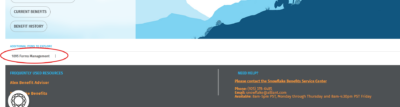
- Once in your profile, see the 1095 Form Management option in the bottom left corner.
- If you are not an active employee, contact a Snowflake Benefits Advocate for assistance, via email at Snowflake@Alliant.com, or via phone at (927) 378-6485.
Health Savings Account (HSA)
If you are an online banking user, your tax documents will be available to you in your online account. If you choose to get paper tax documents, you’ll get a copy in the mail.
- New HSA Administrator Fidelity (Effective September 1, 2025)
- Access your Fidelity HSA on NetBenefits using your existing log-in credentials or contact Fidelity at (800) 544-3716.
- Prior HSA Administrator, HSA Bank (Prior to September 1, 2025)
- The 1099-SA form will be available mid-to-late January in your HSA Bank Portal if you had distributions in the prior year. If you choose to get paper documents, you’ll get your 1099-SA in the mail in late in February. You won’t get the 1099-SA form if you did not take a distribution from your HSA in the previous year.
- The 5498-SA form is typically delivered the month after the tax filing deadline, allowing any contributions made in the current year for the prior year to be included. If you make additional HSA contributions for the prior year after the 5498-SA is issued, you’ll get an updated 5498-SA.
- If you did not have contributions and your balance was zero dollars at the end of the year, you will not receive a 5498-SA form.
- Contact HSA Bank at (800) 357-6246 if you need additional assistance.
- Related documents are also available from the IRS website
Snowflake Form W-2
If you are an active Snowflake employee, from Okta, select the ADP tile. Go to:
- “Myself”
- “Pay”
- “Pay & Tax Statements”
If you are a former employee:
- ADP WorkforceNow (W-2 & Pay Statements): Please follow this guide: How to Register in ADP.
- Once you have set up a username and password, you can access your Pay & Tax statements at https://workforcenow.adp.com/ by navigating to Myself > Pay > Pay & Tax Statements.
- Snowflake pay statements and/or W2’s will remain available in your ADP portal for up to three years from the date your last statement was issued.
- As a reminder, W2’s are issued in January for the previous year and will be mailed to the address on file as of December 31. Use the “Go Paperless” option to avoid potential delays due to address changes, etc.
- Access W-2s and pay statements via ADP WorkforceNow (https://workforcenow.adp.com/). Follow the instructions to register for ADP access: How to Register in ADP. Once registered, find statements under Myself > Pay > Pay & Tax Statements. Statements remain available in ADP for up to three years. W-2s for the previous year are issued in January and mailed to your December 31 address; opting for “Go Paperless” is highly recommended.
- For payroll questions, email payroll@snowflake.com.
